structural / loading analysis
Choose the support condition and load case.
Start with the structural model: support condition, applied loading, and stiffness assumptions. The expanded beam library is grouped by supports before load take-off, stress, and stability screens.
available now
Structural analysis tools.
Choose the closest idealised model. If the real structure does not match the stated support or loading assumptions, use a more suitable analysis method.
Simply supported beams
Determinate beams, from textbook single loads to flexible combinations.
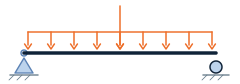
- UDL + central point loadMaximum shear, moment, and elastic deflection.
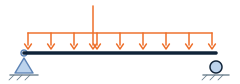
- UDL + point load at any positionLeft and right reactions and critical positive moment.
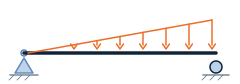
- Full-span one-way triangular loadAsymmetric reactions, moment, and elastic deflection.
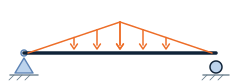
- Central triangular “tent” loadSymmetric reactions and maximum positive moment.
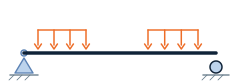
- One or two partial UDL zonesCentral, end, separated, or overlapping loaded lengths.
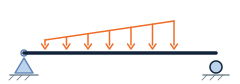
- Partial triangular or trapezoidal loadLinearly varying patch load with reactions, moment, and EI deflection.
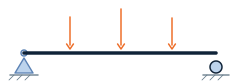
- Up to three point loadsEqual or unequal loads with equal or unequal spacing.
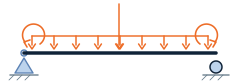
- UDL, point load, and prescribed end momentsSigned boundary moments with a transparent statics envelope.
Cantilever beams
Fixed-free members under individual or superimposed actions.
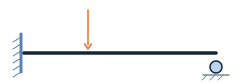
- Free-end point loadFixed-end action, rotation, and free-end deflection.
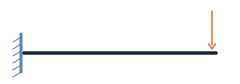
- Point load at any positionLoad-point and free-end movement, including the unloaded tail.

- Full-span uniform loadFixed actions and elastic free-end movement.
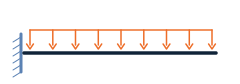
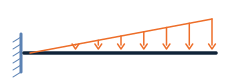
- Triangular load rising to free endPeak intensity, resultant, moment, rotation, and deflection.
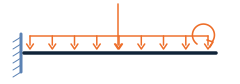
- UDL + point load + end momentSame-sense elastic superposition with component deflections.
Fixed & propped beams
Indeterminate idealisations that require rotational restraint or displacement compatibility.
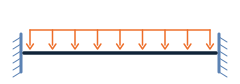
- Fixed-fixed full-span UDLEnd hogging, midspan sagging, reactions, and deflection.
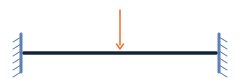
- Fixed-fixed central point loadSymmetric end and midspan response.
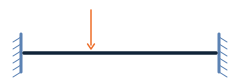
- Fixed-fixed point load at any positionOff-centre reactions, end moments, and load-point deflection.
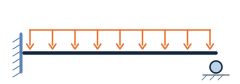
- Propped cantilever full-span UDLCompatibility reactions, hogging, sagging, and deflection.
- Propped cantilever point loadLoad-position-dependent prop reaction and moments.
Overhang & continuous beams
Support arrangements that can create both sagging and hogging regions.
- Single or double overhang beamFull-length UDL, one point load, reaction uplift, and moment envelope.
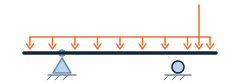
- Overhang with UDL on the endSupport uplift, hogging, and elastic overhang deflection.
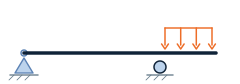
- Two-span continuous beam with UDLsIndependent span UDLs, centre-support hogging, and span sagging.
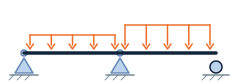
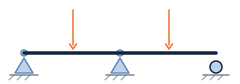
- Two-span continuous beam with point loadsCentral or off-centre loads on either unequal span.
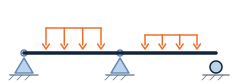
- Two-span continuous beam with partial UDLsIndependent movable load patches, support hogging, and span sagging.
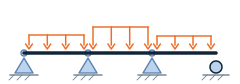
- Two-to-four-span beam with UDLsIndependent span loads and relative EI, including unloaded spans.
Load path
Convert area loading into a transparent member line load.
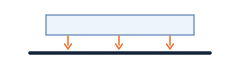
- Slab load to beamSelf-weight, superimposed actions, tributary width, and beam line load.
Stress & stability screens
Simple elastic checks before detailed material and code verification.
- Elastic bending stressStress and utilisation from moment and section modulus.

- Column axial stressGross-area compression stress and utilisation.

- Euler column bucklingIdeal critical load, effective length, radius, and slenderness.

beam library / coverage
One parameterized calculator can cover several diagram tiles.
The library groups equivalent textbook cases into flexible tools. Partial or linearly varying patches cover central and end loading; the multi-span solver covers two, three, or four spans with independently loaded or unloaded spans. Every live page declares its support model, sign convention, equations, and limitations.
- Live now: 24 beam-response tools across six support families.
- New: partial triangular/trapezoidal loading, two-span partial UDLs, and a two-to-four-span UDL solver.
- Next: mixed partial distributed and point-load combinations on continuous spans.
- Later: arbitrary support conditions, stiffness-varying members, and frame analysis through a general stiffness solver.